Searching for jobs in the post-AI world is a very different game than even just a few years ago.
Job applicants today face a very competitive environment, with a multitude of job posting platforms to choose from, some of them flooded with fake postings that make finding the right role feel like an uphill battle.
Fortunately, the same tools that have complicated the job search market can also make it easier. If you know how to use AI in your job search—and how not to use it—you can elevate your profile and have a better chance of landing your dream job (or at least one that makes sense with your career goals).
Ultimately, you may decide that you don’t need or want AI to assist you in your job search, and that’s a completely fine choice. But if you do plan to use a tool like ChatGPT or Claude, here are some tips on how to do it the right way.
Overall do’s and dont’s for using AI
I’m going to get into specifics about the ways you should and shouldn’t run your AI job search, but first, let’s go over some good ground rules to have when using AI in this way.
You are in the driver’s seat. The AI is the assistant.
Before you start using AI in your job search, get into the right mindset. You are the person hunting for a job, and you are going to find that job using your skills, experience, and personality.
The AI is there to help assist you with this process by organizing things you put together, pulling resources for you to vet and review, and reading over things you wrote.
AI is not here to do the job-hunting for you, and giving it too much control over the process is when things will start to go awry.
Question the AI throughout the process.
We all know that the major AI tools on the market tend to “hallucinate.” They frequently make up information to fill gaps in their knowledge, or speak confidently while using outdated or poorly sourced data.
Do not take everything the AI tells you as fact—do the opposite. Assume that the AI is going to get confused frequently. If something seems wrong or impossible, look into it yourself. Don’t let the AI’s hallucinatory behavior sink your job opportunities.
AI can’t replace human feedback
It’s helpful to have AI look over your cover letters and resumes, but it won’t be able to give you the kind of feedback you might get from a trusted friend, colleague, or career mentor.
It’s also no replacement for your own human instinct. If you disagree with changes or feedback the AI makes, trust your own gut over what the machine suggests.
Remember that AI is pre-programmed to agree with you and make you feel good. You can add instructions to prevent this (see the first DO on my list), but it’s a good thing to keep in mind regardless, so that you don’t let the AI’s praise color your perspective.
AI Job Searches: Do’s and Don’ts
DO set up a project with a clear instructions
Most of the major AI tools like ChatGPT and Claude allow you to set up projects for different tasks. Your first step in your AI job search should be to set up one of these with clearly defined instructions and background information.
For example, you might write something like this:
My target job titles: Instructions for you:Background: I’m a 22-year-old recent college graduate with a degree in communications. I have about a year of part-time sales experience and two marketing internships. I’m looking for an entry-level role in sales or marketing, ideally at a mid-size company in the tech or media space. I’m open to remote or hybrid positions in the Northeast U.S.
You should also upload any existing job-hunting materials you have:
- Current versions of your resume
- Recent cover letters or applications
- Screenshots of your LinkedIn page
- Links to your website/social media pages
The more details and information you can give the AI, the easier it will be to use it for the entire job-hunting process. You’ll want to come back to these instructions and update them routinely, as your job search evolves.
DO use AI to organize job leads
One of the best ways to use AI is to help it narrow your job search, so you don’t have to spend hours sifting through postings to find one that might work for you. Once AI has a good understanding of who you are (which is why the project instructions are so important), you can use it to hunt down job boards that are specifically within your industry, or even use it to find potential company leads.
I did this recently, as I’ve been hunting for more organizations that may want to hire me as a writing and editing teacher. I recently used Claude (my AI of choice) to help me create a list of writing organizations that might be currently looking for new teachers. I had to vet and edit it to get it right, but ultimately, it came up with a very useful list, with the websites, hiring statuses, and next steps outlined for 25 different organizations.
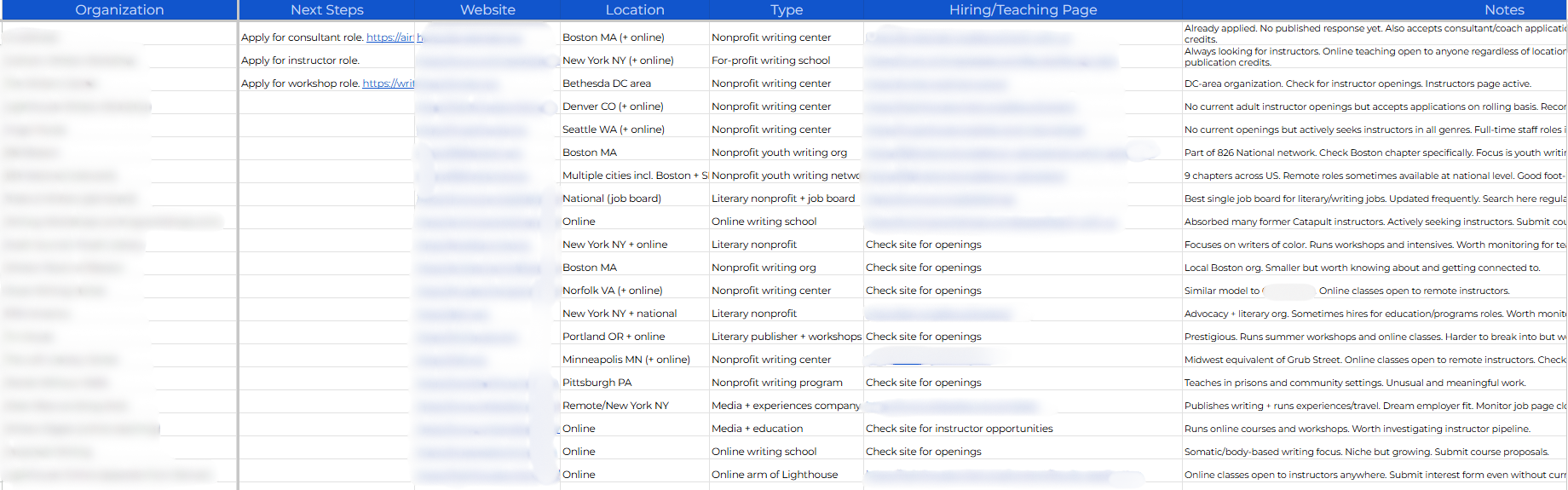
This would have taken me hours to compile on my own, but with AI’s help, I had a complete list ready in 20 minutes and was able to start applying.
This kind of spreadsheet becomes increasingly useful as you start applying to jobs. You can update the “status” and “last contact” date to keep track of which jobs you’ve applied to and who you might want to follow up with.
DON’T use AI to write your cover letter
No one likes writing cover letters, and there was a time when they felt particularly pointless, because many hiring managers never read them.
Those days are over. Now, the cover letter is perhaps the most important part of the job application, because it’s the one area where you can show your personality and communication style.
A lot of people do use AI to write cover letters, and as a result, they all begin to sound the same. All AI tools have a tendency to use the same phrasing, pacing, and vocabulary. And managers who have to read dozens of cover letters at a time will be able to spot AI-language right away.
Instead of asking AI to write your cover letter, do it yourself first. Try writing one or two drafts of the cover letter, then showing it to AI to get feedback. This will result in a much more authentic cover letter than something completely written by ChatGPT.
DO use AI to vet job posts
I can’t tell you how many times I’ve started to apply for a job, only to realize partway through that it was a bad fit. This can be incredibly frustrating, especially if you sink an hour or more into applying before you make the realization.
AI can help prevent this by vetting job posts before you submit. When you find a job posting that looks good to you, copy and paste the description over to AI. You’ll want to do this anyway, if you end up working on an application, but first ask the AI: “Based on what you know about my goals for my next job, do you think this is a good or bad fit?”
This simple task can help you flag those important but easily missed details on any given job post.
DON’T use AI to do samples/work projects for the company
Many companies will ask you to do some sample work as part of the job application. Maybe they want you to write an article, or give a brief presentation, or teach a short lesson.
Once again, it can be very tempting to ask AI to do this kind of task for you. But this is a very risky move.
Companies make this request because they want to see YOUR work, not the work of an AI (unless they explicitly say to use AI during the task). If they discover that you used AI in the task, you’ll lose your chance as a candidate.
If they don’t discover it, and end up hiring you, you’ll still be in trouble—because you’ll be expected to do a job that you didn’t do. The company will have hired you under false pretenses, and it won’t take them long to discover it.
DO use AI to gather info on the company
When you are applying for a job, part of the processes is assessing the company to determine whether it’s a good fit for you. You also need to thoroughly research a company to tailor your resume and prepare for the interview, if and when you get to that point.
AI can be a great research assistant, but you want to steer the AI away from summary, and instead use it as a source-gathering tool. Ask the tool to get you resources that you can review independently.
For example you might ask:
- Can you find a few recent articles on the company blog I should read?
- Can you find the links to this company’s social media channels?
- Can you find news articles that mention this company’s name?
- Are there any pages on this company’s website you think I should review?
This way, you can use AI in your job search to gather resources, but you won’t risk receiving hallucinated summaries from the AI.
DO use AI to review and optimize your resume and LinkedIn
Your resume and LinkedIn page are the first things many hiring managers will see once you apply, so it can be helpful to use AI to review these and make sure they are optimized.
Take screenshots of your LinkedIn profile (or download it as a web page), and ask AI to review it based on the jobs you are applying for. It will give you feedback on everything from your profile photo to your job experience.
Similarly, AI can review your resume and make sure it’s error-free, well-formatted, and using the right keywords and phrases to help it make it past recruiter’s own AI barriers.
If you want more information on optimizing your LinkedIn profile or resume, check out these resources:




DO use AI to practice for your interview
Want to know the antidote for pre-interview nerves? Practice, practice, practice. You’ll feel much better about your interview if you take time to think about the questions you might be asked and practice how you’ll respond.
Start by taking this list of the most common interview questions and giving them to your AI tool. Then ask them to think of any other questions they think might come up in the interview.
Then, it’s time to practice. Consider using voice mode for this, so you can practice speaking your answers out loud. Here’s a prompt you can use for this exercise:
Let’s do a role-play together, where you play the hiring manager for this job. Ask me the questions on our list one at a time. I will respond, and then you ask a follow-up question or the next question. Once we have gone through the full list, provide honest and constructive feedback on my answers. We may then repeat questions or the full exercise to refine my answers.
DON’T use AI to send DMs or personal communications
As you move further along in the job application process, you’ll start making connections with people at the company—hiring managers, or folks who may become your colleagues and supervisors.
Resist the urge to use AI to write correspondence with these people. Once again, these are moments where you can demonstrate your communication skills and personality—using AI to generate emails and DMs will come off as artificial and mask your true self.
If you think your communication skills could use some work, we’ve got resources for that:






DO be honest about AI usage when asked
Right now, most companies are still figuring out exactly what their policies are around AI usage. Some companies are encouraging or even requiring employees to use it, others have banned it out right, and most are in some in-between space that is still taking shape. Staying informed about AI trends can help you have more confident conversations about AI with potential employers: understanding where the technology is headed gives you a genuine edge in interviews at companies where AI is central to the work.
You should look into the company’s AI policy before you start using AI in your job search, and if they are very adamant against its usage, you should forgo using it at all. If they are very pro-AI, then you should not only use it in your job search, but be prepared to talk about how you used it to showcase your skills.
In either scenario, the most important thing is to be honest about whether you did or did not use AI in your job search. Do not start off a new job by lying to your employer—that will only spell trouble down the line.
AI can be one of the best assets for job-hunters out there, if it’s used in the right way. Keep these do’s and don’ts in mind, and when you do land the position, be sure to check out our guide to your first 90 days at a new job.